


CR
Conversion Rate measures the percentage of website visitors who complete a desired action—typically making a purchase. This fundamental ecommerce metric reveals how effectively your site turns traffic into customers and revenue. Learn how to calculate it and apply it to maximize your marketing returns.
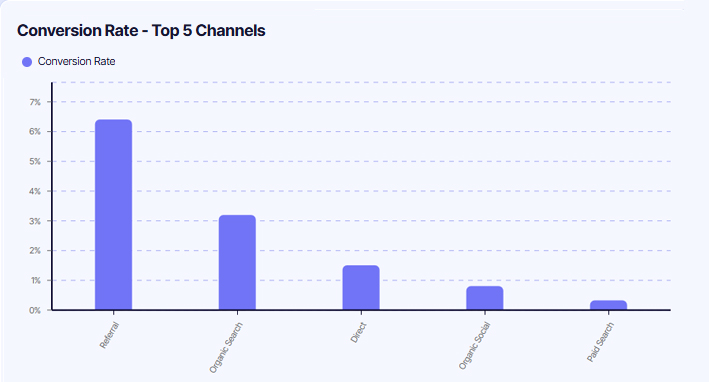
Understanding Conversion Rate
Conversion Rate is a fundamental metric in ecommerce that tells you how effectively your website or marketing efforts are encouraging visitors to perform specific actions. A high conversion rate indicates that your site is effectively engaging visitors and driving them to complete desired actions, whether that's signing up for a newsletter, filling out a form, or making a purchase. Understanding Conversion Rate helps you to evaluate the effectiveness of your marketing strategies and the overall user experience on your site.
How to Calculate CR
CR = Number of Conversions / Total Number of Visits
Give it a go in our Conversion Rate calculator!
Conversion Rate Calculator
Calculation Example
Suppose your profitability model requires at least a 3% conversion rate to maintain acceptable customer acquisition costs. You're planning a marketing campaign that will drive 10,000 visitors to your site this month. Calculate the minimum number of conversions you need to achieve your target:
Number of Conversions = Conversion Rate × Total Visits
Number of Conversions = 0.03 × 10,000
Number of Conversions = 300 orders
Aim to generate at least 300 orders from those 10,000 visitors to maintain your target 3% conversion rate and keep your marketing spend profitable.
Note: The calculation above is for session conversion rate, which is the most commonly used. Alternatively, you could look at lead conversion rate, where you divide the number of conversions by the number of individual visitors. If the same visitor comes back three times, they're counted only once. This helps you understand how many unique visitors convert, giving insight into the effectiveness of your site in converting individual users.

What’s Considered a Healthy CR?
A "healthy" conversion rate varies significantly by industry, traffic source, and product type. While ecommerce averages typically range from 2-3%, the right target for your business depends on multiple factors:
● Industry and product type heavily influence benchmarks. Luxury goods or high-ticket items (furniture, electronics) often see lower conversion rates (1-2%) due to longer consideration periods, while consumables or replenishment products (supplements, cosmetics) typically achieve higher rates (3-5%+) as purchase decisions are faster.
● Traffic quality matters more than volume. Highly targeted traffic from email campaigns or branded search may convert at 5-10%, while cold social media traffic might convert at 0.5-1%. A lower conversion rate from high-intent traffic signals optimization opportunities, while low conversion from awareness-stage traffic may be expected.
● New vs. returning visitors show dramatically different patterns. First-time visitors typically convert at 1-2% as they're discovering your brand, while returning visitors often convert at 3-5x that rate due to established trust and familiarity.
● Device and experience optimization impacts results. Mobile conversion rates are typically 30-50% lower than desktop, not because of user intent but due to friction in the mobile experience. If your mobile rate is dramatically lower, it signals UX improvements are needed.
Tip: The key is establishing your baseline, then systematically improving it through testing and optimization rather than chasing arbitrary industry benchmarks that may not reflect your specific business model.
CR FAQ
How can I improve my conversion rate without discounting?
Should I track different conversion rates for different events?
Does a high conversion rate always mean success?
How does traffic source affect conversion rate?
Can improving conversion rate actually hurt my business?
How often should I measure and review conversion rate?

All-in-one platform, for ecommerce and B2B.


